What is the difference between Claude chat and Cowork?
Chat is a conversation: it hands back an answer, or a copy of your file as a download, and filing it is your job. Cowork is a handover: it plans the steps, works in folders you have given it and changes the file where it already lives.
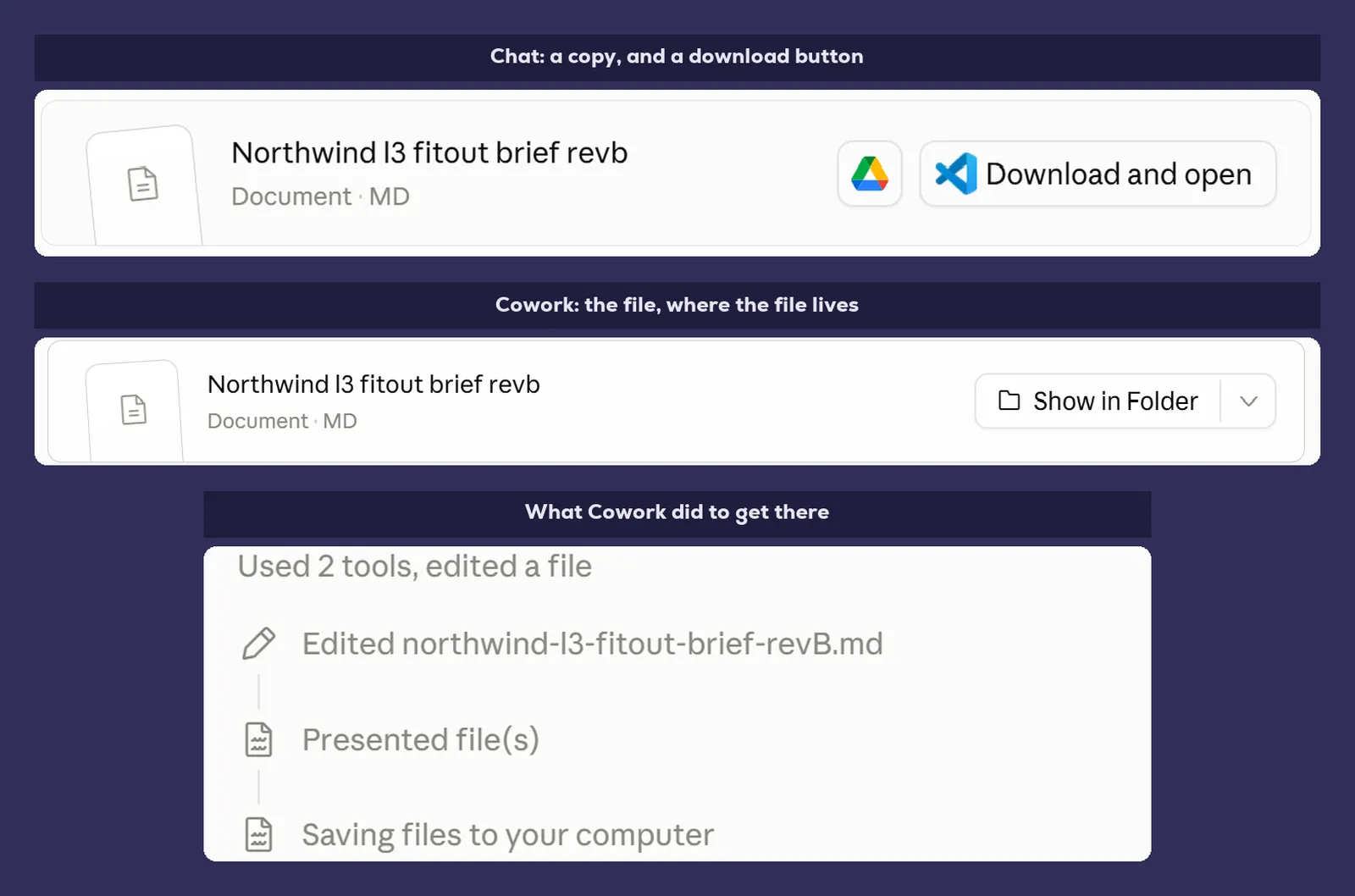
- The difference is where the result ends up. Chat edits a copy in its own sandbox, Cowork edits the original in your folder.
- Cowork works out the steps, does them in order and checks its own output, and you can watch and interrupt in the activity panel.
- If you would be copying the answer somewhere afterwards, or going back to change it more than once, it is a Cowork job.
- Cowork needs a paid Claude plan, plus the desktop app if you want it working on local files.
- Cowork is slower and not automatically cheaper, so quick questions still belong in chat.
By Stephen Kearney
If you’re paying for Claude and using it to ask questions and paste the answers into Word, you’re using about a tenth of what you’re paying for.
I say that with some confidence because it’s what I did for the first few months. Ask a question, get a good answer, copy it out, tidy it up, move on. Useful. Roughly the same as having a very well read colleague on the other side of a window. They’ll write you anything you ask for, and they’ll happily take a copy of your document away and mark it up. What they never do is touch the one in your filing cabinet. Every change comes back as a copy, and filing it is your problem.
Then there’s the other mode, where they’ve got a key to the cabinet.
This is the first post in a series on getting actual work out of Claude. Not prompt tricks. The setup, the settings, the parts that take an afternoon to get right and then keep paying you back. We’ll start with the difference between the two modes, because if you don’t get this one straight, none of the rest of it lands.
The difference is what it’s allowed to touch
Chat is a conversation. You ask, it responds, and it’s your job to do something with the response. It’s had a decent upgrade lately and it can now make and edit files too, in its own sandbox, which it hands back to you as a download. Useful, and further than it could go a few months ago.
Cowork is a handover. You describe a job, it plans the steps, does them, and comes back when the thing exists. It works in folders you’ve given it, uses tools you’ve connected, and it changes the file where the file already lives.
That last part is the whole difference, and it survives every feature update either mode gets. It isn’t about what Claude can make. It’s about where the result ends up.
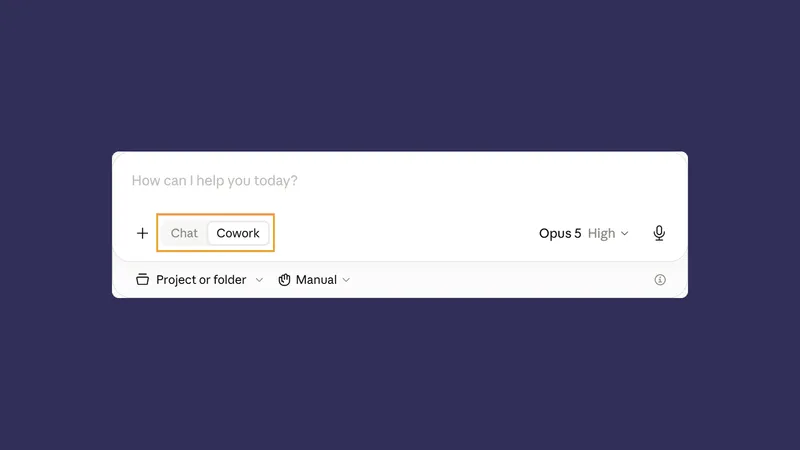
The switch between the two is a toggle in the message box, in the same spot where you’d normally just start typing.
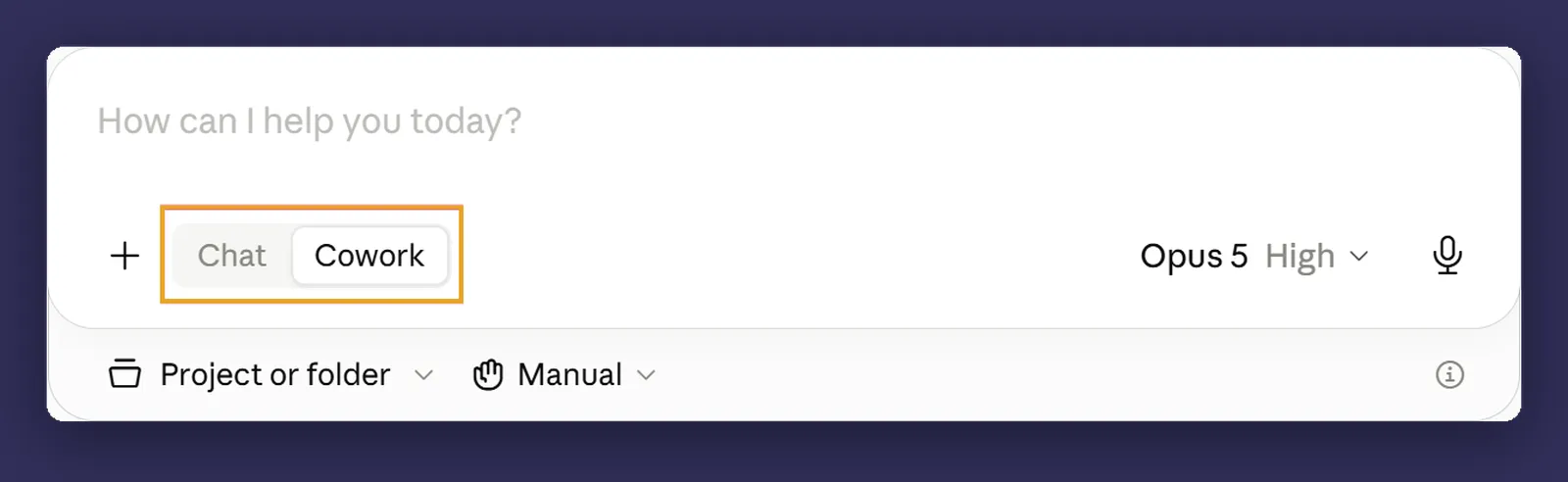
That’s the whole barrier to entry. There’s no separate app, no install, no admin request. It’s a control that’s been sitting there the entire time.
The change has to land somewhere
Take our project brief, two pages, and say the heading in section three is wrong.
Upload it to chat and ask for the fix, and you’ll get it. It edits the file and hands you a download. Genuinely handy, and newer than most people realise.
Now look at what’s on your computer. The brief in your project folder is exactly as it was. What you’ve got is a copy, sitting in a sandbox tied to that conversation, and a download button. The last step is yours: save it, find the original, work out whether anyone else has touched it since, replace it.
Then you spot a second thing that needs changing, and you do it again. And now there are two versions in your Downloads folder with near enough the same name, and the one in the project folder is a third thing, and the honest answer to “which one is current” is that you’d have to open all three to find out.
That’s not a criticism of chat. It’s working through a window, which means the last twenty seconds of every job are yours, and they’re the twenty seconds where version control quietly dies.
Cowork does the same edit in the file, in the folder, and it’s still there tomorrow. There’s no download, because there’s nothing to download. There’s no “which version is current”, because there’s one version and Claude changed it.
What “agentic” means, without the word agentic
You’ll see Cowork described as agentic, which is a word that has been doing a lot of work in marketing material lately and not much work in explaining anything.
What it means in practice is that Claude does the middle bit.
Normally you’re the middle bit. You ask a question, get an answer, decide what to do with it, ask the next question, and so on. You’re carrying the job between steps. In Cowork, it carries the job: it works out the steps, does them in order, checks its own output, notices when something didn’t work, and tries a different way.
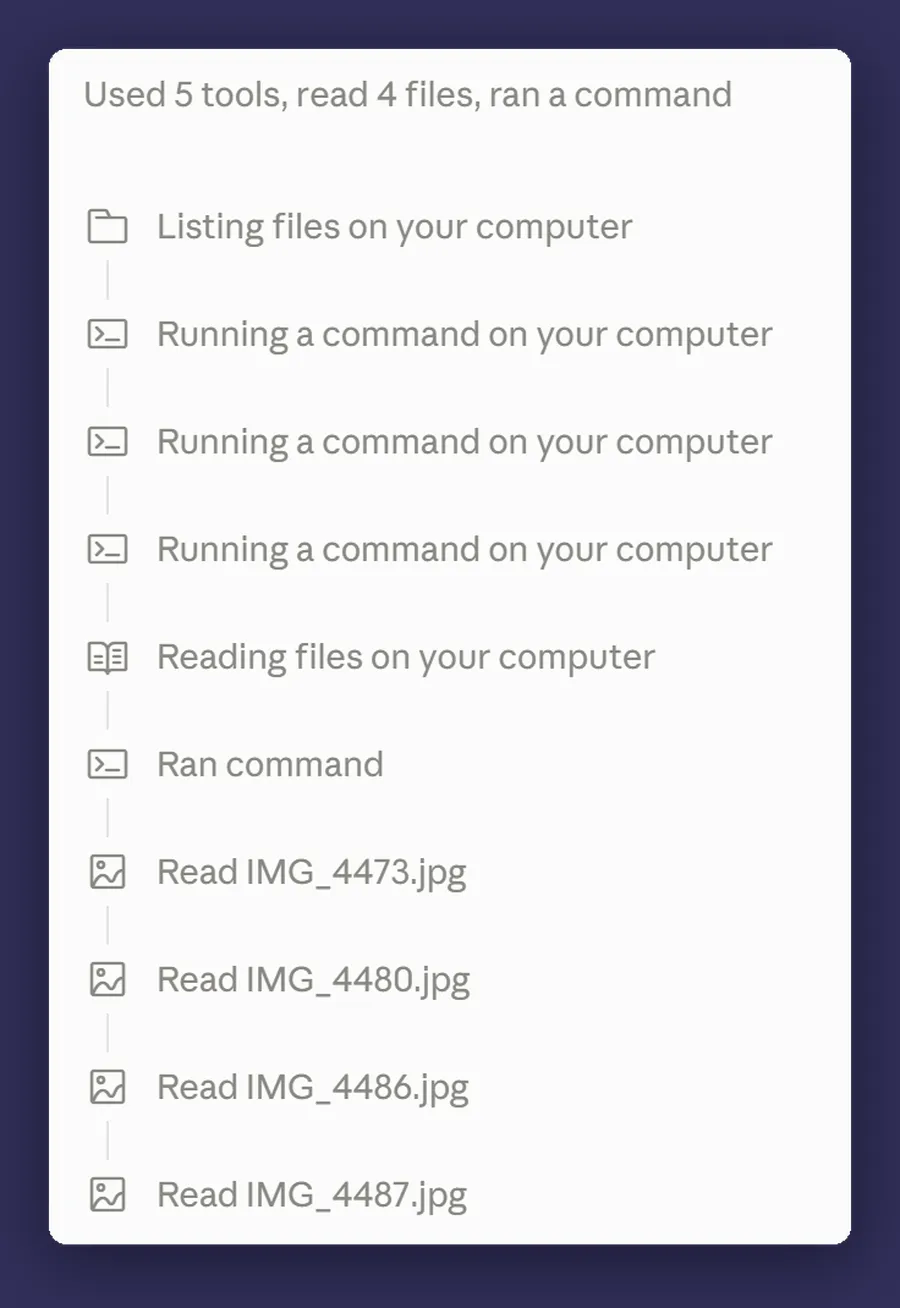
You can watch it happen. There’s an activity panel showing each step as it goes, and you can interrupt at any point and redirect it. That matters more than it sounds, because the useful skill here isn’t writing a clever instruction. It’s noticing at step four that it’s heading somewhere wrong and saying so.
Three jobs that are Cowork jobs
Abstract explanations of AI capability are worth very little, so here are three real shapes of work. I’ll use a fictional commercial fitout firm, Northwind Fitouts, throughout this series so the examples stay consistent.
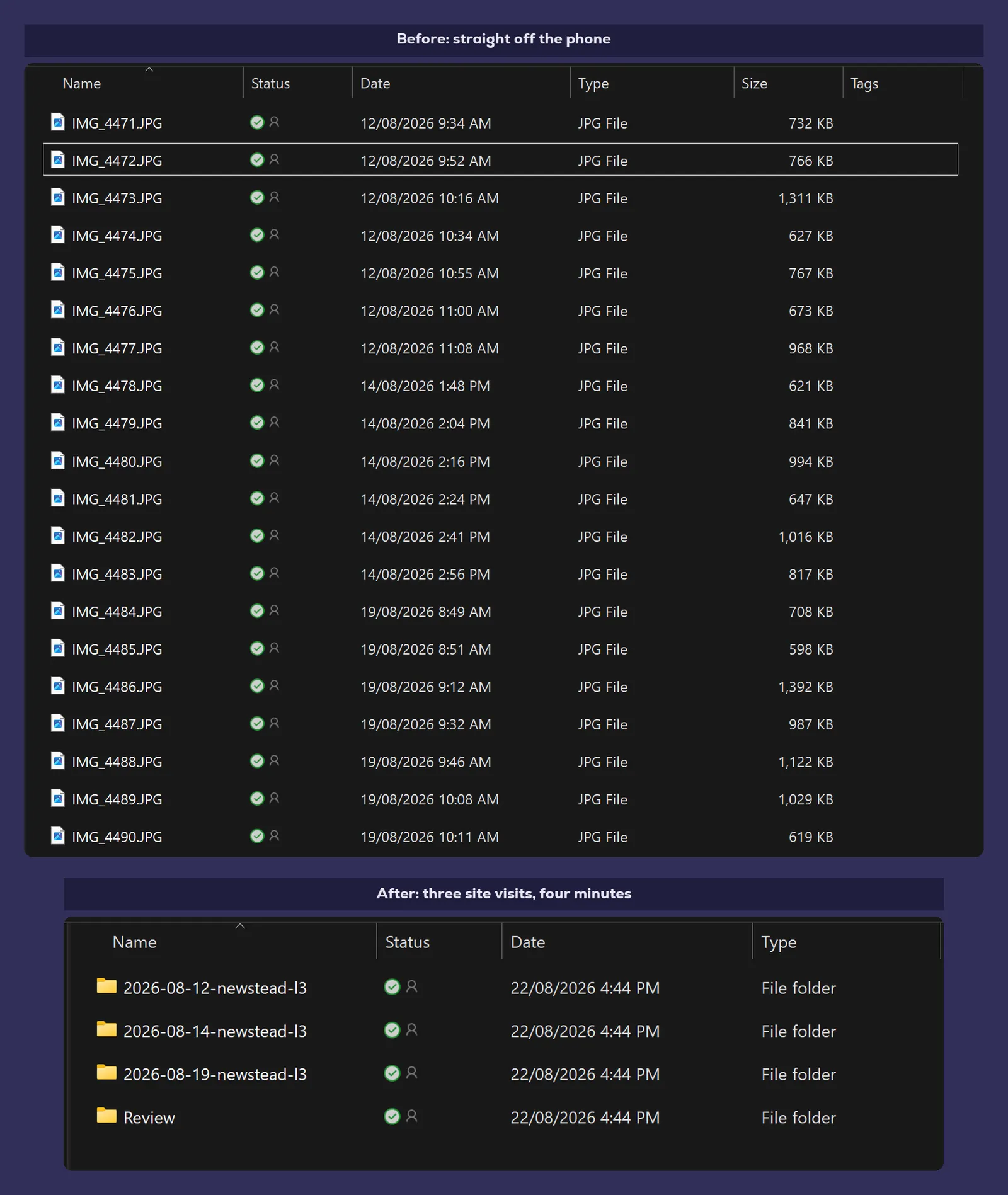
The 200 site photos. A job finishes and there’s a folder with 200 photos straight off someone’s phone, named IMG_4471 through IMG_4670. They need sorting by date, renaming by site, and the blurry ones culling. That’s a two hour job for a person and about four minutes for Cowork, and no amount of chatting to an AI will get it done, because chat can’t touch the folder.
The two spreadsheets that should agree. Quotes in one system, invoices in another, and someone reconciles them monthly by eye. Cowork opens both, compares them, and hands back a list of the twelve that don’t match and why.
The folder of meeting notes. Six months of rough notes in a client folder, and you need a project summary for a renewal conversation on Thursday. It reads all of them and writes the summary into the same folder as a Word document, formatted like your other Word documents.
The pattern across all three: there are files involved, there are multiple steps, and at the end something exists that didn’t before. Two tests, and either one is enough. If you’d be copying the answer somewhere afterwards, it was a Cowork job. If you’d be going back to change it more than once, it was definitely a Cowork job.
What you need
A paid Claude plan. Pro, Max, Team or Enterprise. It isn’t on the free tier.
The desktop app, if you want it touching your files. Cowork also runs on the web, on mobile and in a Chrome side panel, and sessions follow you between them, but local file access, local connectors and browser control all need the desktop app open on the machine that holds the files.
That’s it. No infrastructure, no integration project, no procurement conversation.
One thing worth knowing about where the work actually happens. Where Cowork runs is a setting, not a fact. In Settings, “Run new tasks in the cloud” decides whether a task starts on Anthropic’s infrastructure or on this computer. With it on, your files leave your device, and the approval prompt says so. That’s the reason the next post in this series is about permissions before it’s about anything clever.
Where it bites
Cowork is not automatically cheaper. It’s doing a dozen steps where chat did one, and on a single quick job that costs more, not less. What you’re buying is the last twenty seconds of the job, not a discount.
The line between the two keeps moving. Chat couldn’t create or edit a file at all until fairly recently, and I had a draft of this very post claiming it still couldn’t. Anything anyone tells you about what Claude “can’t do”, including me, has a shelf life measured in weeks. The question worth learning isn’t which mode has which feature. It’s whether the thing you want changed is a copy or the original.
It’s slower. Deliberately. A Cowork task can run for several minutes while it works through steps. Don’t use it to ask what time it is in Perth.
Memory follows you, and it isn’t walled off. There’s one memory store on your account, filed into areas. Something saved in one place can surface in another, including an ordinary chat. Useful, and worth knowing before you assume a client boundary is doing work it isn’t.
And it will do the wrong thing confidently. It’s fast and capable and it does not stop to wonder whether the job made sense. That’s your job, and it’s the reason approval settings exist, which is exactly where we’re going next.
Next
Post two: connecting your first folder and getting one useful job done in about fifteen minutes. Pick the least important messy folder you own before then.
If you’ve had a Claude subscription sitting there for months and never touched the Cowork toggle, that’s the entire point of this series. And if you’d rather talk through what’s worth pointing it at in your business before you start, that’s a conversation, not a pitch.